
ICMR Structure
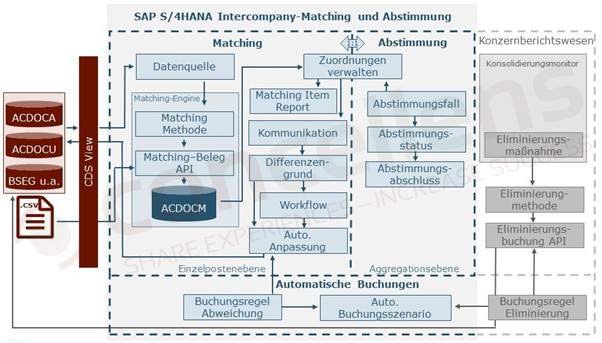
The ICMR solution consists of three components: matching, reconciliation, and automated journal entries. After intra-group transactions have been reconciled, they are eliminated in the consolidated financial reporting process.
Matching takes place at the line item level; by using a reconciliation case, an aggregated view can be created.
The ACDOCA accounting database table, the BSEG table (accounting line items), and the ACDOCU consolidation database table can be used as data sources for matching. The data source is based on a CDS view. The records to be read from the data source can also be filtered. A major advantage of the ICMR is that the data sources can be accessed in real time.
The matching method defines the data source that the matching engine uses. Individual matching rules are defined within the method to reconcile the data records. Reconciliation takes place at the transaction currency level using various reconciliation types. Various reasons for discrepancies are defined in the matching rules. These provide information on why certain items were reconciled or what post-processing activities are required, and they can trigger approval workflows and automatic adjustment entries.
For example, the matching engine can handle the following typical matching scenarios:
An exact match occurs when the transaction currency codes and the amounts on the IC documents match. The assignment reference number can also be used for verification.
In the case of an exact match, the documents match, and no follow-up actions are necessary.
The data records can be reconciled using tolerance limits, which automatically highlight any discrepancies. This eliminates the need for the accounting department to manually reconcile each individual account. ICMR offers the option to view the differences in detail for each intra-group transaction or aggregated across companies.
Technically, documents whose amounts fall within the defined tolerance range are automatically assigned. Based on this reconciliation, follow-up actions may be triggered, such as the need for a comment or an approval workflow. The reason for such a discrepancy may be an incorrect manual posting, tax differences, or a change in the exchange rate between the time of posting and the reconciliation run.
The transaction currency code is different, but the amounts match. In this case, an automatic assignment is made as an exception with follow-up activities.
Cash in Transit: This scenario may, for example, be based on different fiscal year-end periods (shifted fiscal year). In this case, a final resolution is not expected until the next or a later period. In the meantime, the company that has already submitted an IC transaction posts a temporary adjustment using a clearing account. The transaction is assigned a difference reason of “Temporary Clarification.” When the reconciliation is then performed in the next period, the assignment is automatically reversed. Once the open IC transaction from the partner company has been received, the temporary adjustment is reversed and the actual document is posted.
Open and unmatched items over a defined period are grouped under an assignment number and must either be processed manually or carried forward to the next reconciliation run.
If duplicate entries occur, these documents are flagged as exceptions, and follow-up actions—such as canceling one of the documents—become necessary.
Additional custom scenarios can be created and compared.
The Matching Document API is used to store the records assigned by the matching rules in the ICADOCM database table. The Matching Document API is also used to store records that were imported via flexible upload in the database table.
Using the SAP Fiori " Manage Assignments " app, you can manage matching results from the perspective of the matching method or the reconciliation case. Manual assignments can be created or canceled, and communication within the IC team can be initiated from here (email, in-app notifications, and notes).
Automatic adjustment entries require posting rules, which are assigned to a posting scenario. The adjustment can then be made for ACDOCA and ACDOCU.
The reconciliation scenario, which enables aggregated reconciliation, corresponds 1:1 to the matching method. In this reconciliation scenario, display groups are created. Filters and tolerances can be defined within these groups to compare data records with one another. These settings also form the basis for the reconciliation report (reconciliation status overview).
Once the verification of the reconciliation results is complete, the reconciliation completion status is set. This status determines whether new entries are included in processing.
There is a new elimination method for consolidated reporting. This method is also based on posting rules. The consolidation of reconciled IC transactions takes place outside the ICMR solution in the Consolidation Monitor by executing the elimination task.