

SAP® Strategic Enterprise Management Business Consolidation System
Flexibility and efficiency with SAP SEM-BCS: functions, reporting and migration to modern solutionsSAP SEM BCS (Strategic Enterprise Management Business Consolidation System) is a classic SAP product and is used by numerous large corporations for the preparation of consolidated financial statements, group planning and reporting. Users of SAP SEM BCS have access to a wide range of functions that significantly accelerate the consolidation process. Both business users and IT managers can flexibly adapt the system to their specific requirements.
Functions of SAP SEM-BCS
Unlike itspredecessor, the SAP® Enterprise Controlling and Consolidation System, and the strategic consolidation solution Group Reporting, SEM-BCS is based on a multidimensional data model in SAP Business Warehouse. This allows you to map business requirements with a high degree of flexibility and automation.
Thanks to the existing process view for the specialist department, you can use SEM-BCS to track the progress of the consolidated financial statements in real time and process data at the same time.
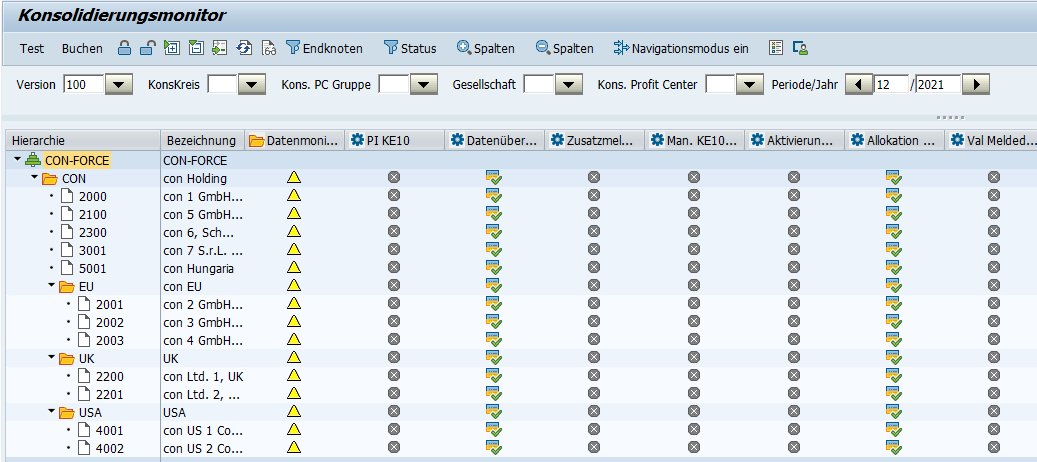
You can keep track of the consolidation steps and consolidation units that have already been carried out in the consolidation monitor. The consolidation steps are visible on the basis of tasks that are created in a specific order - the task hierarchy.

Capture all data in real time
Consolidation managed in this way provides audit measures at various levels. In addition to the business requirements - such as assets = liabilities - the technical requirements are also validated as part of these checks. You then receive information, warning and error messages as to whether you can continue the process or whether manual intervention is necessary. This enables you to record, evaluate and report on all Group data in real time.
Assign your receipts to each posting
The SEM-BCS software works with documents. These in turn are created on the basis of the account assignment level concept. Regardless of whether the tasks are carried out automatically or you make manual postings, you can view every document at any time. All documents are assigned a unique document number and account assignment level during a posting process.
Another advantage of SEM-BCS is the ability to test the execution of measures. This allows you to see immediately whether error or warning messages have been generated and you can correct them before the first real posting run.
Benefit from versatile and integrated reporting
The SEM-BCS solution already offers you various reporting options in the consolidation monitor. You can view and analyze all documents and totals records posted since you started using the tool. Here you have a comprehensive filter option that includes all master data and its characteristics. The "List of documents" function is particularly helpful, allowing you to view all the documents associated with the totals record.
You can also use Analysis for Office (AfO) to independently create queries based on Business Warehouse objects such as info and multi-providers and make them available for external purposes. You also have the option of integrating data from other departments, such as Controlling.
Set functions and master data variably for different versions
In addition to legal consolidation in accordance with the German Commercial Code (HGB), your group would also like to map legal consolidation in accordance with IFRS. In addition, it should also be possible to analyze forecast and planning data. This is easily possible with SEM-BCS. You can simply create an additional version for each of these requirements. For each version, you decide in which functions and master data it should differ from the other versions. You can discuss the right approaches and procedures with us in a workshop and using our coaching approach.
Expand and use new functions as quickly as possible after a release upgrade
In other consolidation tools, you have to write programs and define logics. With SEM-BCS, it is easier to define new functions. To do this, you use the so-called business functions. Depending on the release status, you can activate different business functions. Typical functions that are available after activating business functions are, for example, the options for making organizational and structural changes to the group and merging consolidation units. We can discuss the individual enhancement options for the SEM-BCS application with you in our workshops. Otherwise, we will be happy to take over the customizing for you.
BW/4HANA as an interface
BW/4HANA serves as a powerful interface for integrating and analyzing company data. The platform offers functions for extracting, transforming and loading data (ETL) in order to integrate various data sources from non-SAP systems. BW/4HANA also enables comprehensive analysis of data in real time using modern data warehousing technologies. Overall, BW/4HANA offers a central platform for bundling, transforming and analyzing data.
SAP SEM-BCS to SAP BCS/4HANA Migration: A Guide
As part of SAP's product development and strategy, support and further development of SEM BCS will be discontinued at the end of 2027 (SAP Note #1171344). SAP has developed more modern solutions, such as SAP® Business Consolidation for SAP BW/4HANA and SAP S/4HANA® Finance for Group Reporting , to meet the increased demands on consolidation and financial reporting.
BCS/4HANA offers companies that already use SEM BCS the following key advantage: investment protection for the consolidation and group reporting application built up in the past. SAP offers the option of migrating from SEM BCS to BCS/4HANA. We can discuss the migration options with you in our workshops.
The migration from SEM BCS to SAP BCS in conjunction with SAP BW/4HANA requires careful planning and execution. There are basically two ways to migrate - in-place or remote conversion. The procedure differs depending on the target release.
Your benefits with SAP SEM-BCS
Focus on strategic management
SEM BCS focuses on strategic management and corporate planning. It offers functions to support planning, budgeting and strategic analysis.
Currency conversion
The solution supports the conversion of financial data into different currencies, which is crucial for multinational companies.
Compliance with accounting standards
The solution ensures that companies can comply with local and international accounting standards and regulatory requirements.
Audit trail and security
SAP SEM BCS offers comprehensive monitoring and audit trail functions to ensure data security and traceability.
Integration into the SEM portfolio
SEM BCS is part of SAP's Strategic Enterprise Management (SEM) portfolio. This means that it can be seamlessly integrated with other SEM modules, providing companies with a comprehensive suite of tools for strategic management.
Elimination of intercompany transactions
SAP SEM BCS offers the option of automatically eliminating intercompany transactions to avoid double counting in the consolidated financial reports.
Core benefits of SEM BCS
The core benefit of SEM BCS is the simplification of consolidation and reporting in complex business environments. Overall, SEM BCS offers companies familiarity for existing users, flexibility and customizability, better financial control, reduction of time and effort, and integration into the SEM portfolio.
Challenges and alternatives
Despite these advantages, however, it should be noted that the solution is being superseded by more modern alternatives, particularly with regard to SAP BCS/4HANA in conjunction with BW/4HANA and SAP S/4HANA Group Reporting. These offer extended functions and better integration.
Our range of services
Our range of services includes not only the technical implementation, but also the development of concepts, specialist advice and ongoing support. We make sure that the software runs smoothly and offers the maximum benefit for your company. In addition, we offer comprehensive consulting services to assess how we can best support you with our customized solutions.
With concellens: Choosing the Right SAP Setup
concellens is synonymous with excellent consulting services in corporate consolidation. We help you find the right SAP setup for your company. To do so, we rely on a clearly structured approach:
Preliminary Meeting
What systems and licenses are you currently using? What are your goals?
Strategic Workshop
Together, we'll analyze the complexity of your group consolidation requirements and determine whether BCS/4HANA or Group Reporting is the best solution for you.
System Preview
In a demo system, we'll show you live how the system works and what features you can expect. We'll provide the necessary sample data for this.
Minutes of the Results
To help you make an informed decision, we will provide you with a detailed decision-making template that includes specific recommendations for action.
Why concellens?
With our expertise in SAP consolidation solutions and a clearly structured consulting process, we help you find the optimal solution for your needs—whether you’re migrating from a non-SAP system, streamlining your existing SAP environment, or implementing a completely new consolidation system.

Your contact person

Mr. Patrick Feldmann
Senior Business Consultant
Our Latest Articles
Knowledge

When Investment Data Becomes a Bottleneck in the Consolidated Financial Statements
How zetVisions CIM, in conjunction with SAP® S/4HANA Finance for Group Reporting or SAP SEM-BCS, enables an end-to-end process from investment management to consolidated financial statements. Modern consolidation, but manual processes remain Many companies have...

SAP® BCS/4HANA or SAP® S/4HANA Finance for Group Reporting: Which Consolidation Solution Fits Your Group Strategy?
Implementing or modernizing a consolidation solution is one of the most strategically important decisions in the finance department. It not only affects the Many corporations are currently facing a pivotal decision: What should their future consolidation architecture...

SAP® BCS/4HANA or SAP S/4HANA® Finance for Group Reporting? A Decision-Making Guide for CFOs on Choosing the Right SAP Consolidation System
Implementing or upgrading a consolidation solution is one of the most strategically important decisions in the finance department. It affects not only the consolidated financial statements, but also the quality of management information, the level of automation in...